Every week-end or so, I like to update my linux servers to keep them patched
and secure. They are ARM64 single-board computers manufactured by Korean
hardware manufacturer ODROID. I use them for a variety of use-cases such as
media server, NAS, and sandbox environments for personal projects. Even though
I am the only user of this system, I need it to be secure.
As most GNU/Linux user, I’m guilty of mostly blindly trusting the OS’ built-in
package manager. It is however a crucial aspect to take into consideration to
keep a system safe. Since commands like apt upgrade or apk add are executed
as root, we must pay extra attention when we are issuing these commands.
Relying on a package manager to install and manage our dependencies is a great
way to stay safe. We basically delegate to package maintainers the
responsibility to accept or refuse to distribute packages. Using a package
manager is already a step-above, security-wise, manually installing packages
downloaded from the Internet
Package management is assured by knowledgeable and reliable people.
They are expert in managing packages dependencies to avoid conflicts or
problems.
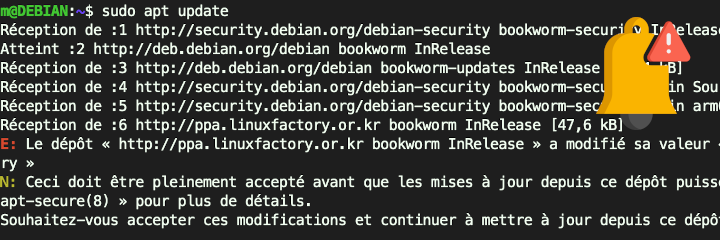
During last upgrade, I ran across an unusual message such as
E: The repository “ http://ppa.linuxfactory.or.kr/ bookworm InRelease “ has
changed its “ Origin “ value from “ Dongjin Kim <tobetter(at)gmail.com> “ to “
LinuxFactory “.
N: This must be fully accepted before updates from this repository can be
applied. Please refer to the manual pages “ apt-secure(8) “ for more details.
My first thought was that maybe a malicious actor tried to take control of the
upstream I use to keep my Odroid machines up-to-date. That was the
appropriate level of paranoia to display in order to stay safe. I cancelled my
upgrade plans until I could be confident this change in APT upstream was
legitimate.
validate APT trusted keys
The first thing I did was to validate that the cryptographic signature chain used by APT to verify the upstream repository’s authenticity was intact. Executing command
apt-key list will list currently trusted keys by the APT package management
system. Or better, since apt-key is deprecated: checking keys in
/etc/apt/trusted.gpg.d/ is also useful. The key used by the maintainer listed as “Origin”
hadn’t change.
Knowing that the maintainers were still using the same key was a relief. The
change in “Origin” was concerning since it could yield a potential risk of the
repository being compromised or hijacked.
search public information about the change or contact the package maintainer
To conclude my investigations, I browsed the manufacturer’s public
forum ODROID by Hardkernel for news about
this change.
Since it was not mentionned, I emailed the maintainer who kindly confirmed he was the
origin of the change and that I could trust the change. Which I doubly
appreciate since it is right now a long holidays in asian countries for
the Lunar New Year 2025 (Wednesday January 29th 2025).