Sunday November 1st 2026 by SocraticDev
My new projects need databases. The latest one takes a local-first approach, which means the app stores and processes data primarily on the user's own device. That could be a laptop, a phone, or an IoT device. To keep data in sync across devices, though, we still need a cloud server that's online 24/7.
Going local-first cuts down on the complexity that comes with traditional client-server systems. And, most importantly for me, it helps keep costs down.
The first challenge is that I don't have full control over my cloud account. Its resources could change, or the account itself could disappear. So the first rule is to treat our infrastructure as ephemeral—especially the data stored on it.
disaster recovery plan
When it comes to infrastructure and infrastructure as code, I can bring the system back up on Azure in under 30 minutes, taking my time. Restoring the data in a PostgreSQL database adds about 20 minutes, to be realistic.
Knock on wood. But if Azure isn't an option, I can spin up a Debian VM with another cloud provider, run the same Ansible playbook, and follow the same process to restore the database backup.
Most users probably wouldn't even notice an outage, since they do most of their work on their own devices. While the server is down, their data just won't sync. Once the service is back up, the app will catch up and sync everything.
The catch: while sync is down, teams working on the same files will have to take a coffee break until the service is back (fika!).
For our Recovery Point Objective (RPO), the goal is zero data loss. The users' devices are the source of truth, which takes a big weight off our shoulders.
For our Recovery Time Objective (RTO), depending on what went wrong, we estimate we can be back online within an hour of diagnosing the incident.
backups and restores
I designed the automated backup system around the same local-first philosophy. In other words, the backup lives on my personal computer!
The sync server and its database keep the data federated. They're publicly available on the internet and run 24/7. In my case, someone else is lending me the server, so it could disappear at any time—not just the server, but the entire Azure account.
So I want to be 100% independent of the cloud for backups. Storage on my own computer is free. The one catch: it's not always on, and it's not reachable from the internet.
the requirements
- Backups should run on the server every hour.
- Creating a backup should be extremely fast.
- Backups shouldn't slow down normal operations.
- Backups must always be encrypted.
- It has to be free—I don't want to pay another cloud provider to store these backups.
- Restoring a backup should be dead simple.
restic: the backup tool I chose
The backup process is fully automated, except for restoring the backup to the database server, which still requires a human.
After the community unanimously recommended it (okay, it felt unanimous), I went with restic for backups and restores. It's fast, efficient, and secure. Inspired by git, restic is built around the idea of a repository, which makes it easy to manage backups and restore snapshots. It combines the space savings of incremental backups with the integrity checks you'd want from a full backup.
I appreciate how much the author emphasizes the restore process. A backup is only as good as your ability to restore it—and your odds of successfully doing so. Since adopting this backup system, I've taken part in two disaster recovery (DR) drills. The first hit an issue unrelated to restic, but both times I was able to restore the data to a new PostgreSQL server successfully, in no time.
how the automation works
On the source server, I set up a systemd timer to run a restic backup command on the database files. Every hour, restic takes a snapshot of the database. To keep the backup footprint small, we keep only the latest snapshot.
I don't want to send the data to storage in the same Azure account, or pay for storage in another account with AWS or GCP. Instead, I want to send the backup to my personal computer, where I've got plenty of cheap storage.
Since my personal computer isn't reachable from the internet, I use a pull setup. At regular intervals, as long as my computer is on, it connects to the production server and downloads the latest backup.
I clone the same restic repository onto my local machine, creating a mirror of the production server's repository. That way, I can use the same restic password to decrypt the backup and the restic binary to restore the database.
Finally, just like on the production server, I set up a systemd timer on my personal computer. It runs every 60 to 90 minutes, using rsync over ssh to efficiently copy the restic repository—and the latest backup—from the production server.
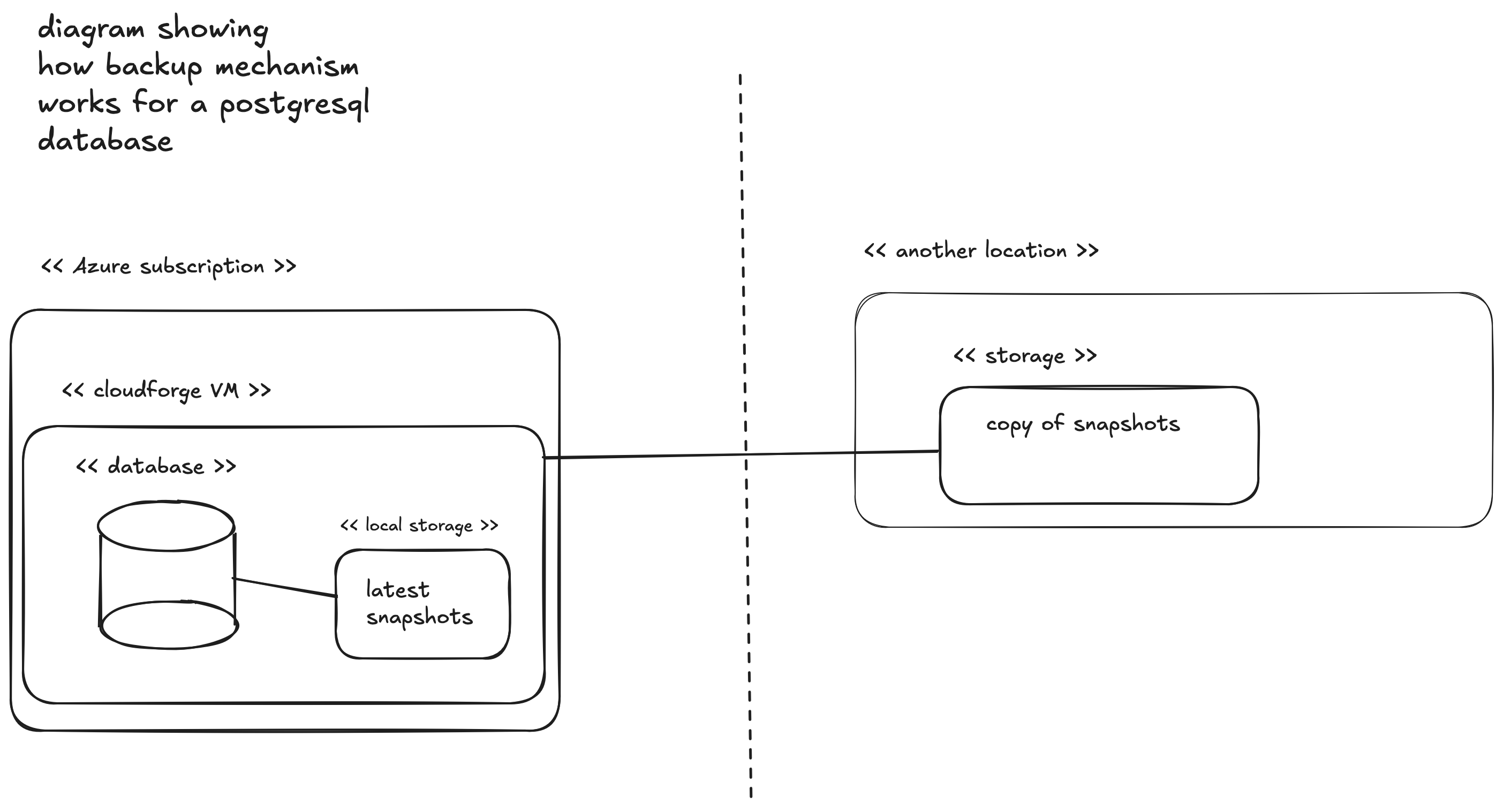
How the backup flow works for a PostgreSQL database using restic.
monitoring and operations
For now, we don't have many users, and an outage isn't an emergency. So there isn't any sophisticated monitoring for the infrastructure or the services running on it.
That said, since this summer I've been doing a monthly backup drill: I rebuild the system from scratch in a sandbox environment, restore the database from the latest backup, and make sure the service is 100% functional.
These drills help me spot weaknesses in the backup system. And every time, they confirm that it works: we can bring the service back without losing data, and without taking too long.
translated from french by ChatGPT
sources
Wikipedia/restic: https://en.wikipedia.org/wiki/Restic
GitHub: https://github.com/restic/restic
Changelog - Restic has your backup (Interview): https://www.youtube.com/watch?v=NWec_ggU0aY